Showing posts with label tutorial. Show all posts

Printscreen For Samsung Corby II | Tutorial

Memandangkan hari ini keyword ini yang menjadi carta untuk disearch, tapi tak jumpa di blog ini pun.


How to printscreen? Actually for Samsung Corby II, it is in the simplesy way. Just hit two button in samsung corby II. Just follow these steps.

Firstly. lets recognize the buttons involved.


Next steps, choose the screen to printscreen. For example, hit the menu button and it will be like this.


These picture that we want to printscreen. So the steps, just hit the button 1 and 2 
(like the first picture) simultaneously. Must SIMULTANEOUSLY.

DONE!

p/s : Kalau grammar K.O. Buat tak tau je ye. :P


Thanks for reading. Easily to drop comment here. Like also :)

Tutorial Font For Samsung Corby II


Assalamualaikum,

Kali ini ingin berkongsi ilmu dengan anda semua mengenai utk install font di S3850 iaitu Samsung Corby II. Its quite complicated tapi kalau ikut steps by steps, nanti takde masalah punye.

Get ready Guys!

First sekali mesti @ wajib ada dua item ini untuk di install kedalam laptop anda!


Dah install dua-dua item ini, barulah boleh bermula tutorial kita.

Yang paling penting mesti ada USB cable tersebut supaya handphone dan laptop dapat bersambung. Dan pastikan bahawa skrin henfon itu hitam/gelap supaya steps seterusnya dapat dibaca.

Jom lihat tutorial melalui gambar2 ini. Harap dapat membantu :)


1. Firstly, Pergi kepada start up dan search Device Manager


 Part ini Paling PENTING sebab utk cari PORT berapa. Take note!


Setelah siap semua di atas ini, Disconnect TK File Explorer.
Seterusnya kita akan set up ke mobile pula.

Untuk ke mobile pula, Pergi ke Settings >> Display & light >> Font Type (font yg telah kita install)


Enjoy it guys! Kalau suke tutorial ini. Sila like n share. :)

p/s : Waktu time buka TK File Explorer, jangan buka Samsung Kies sebab nanti tak boleh baca. :)


Thanks for reading. Easily to drop comment here. Like also :)

Spice Up Ur Corby II


assalamualaikum,

Kat sini nak share satu benda yang nak spice up lagi henfon baby corby anda. Nak stylish dengan menukar font di henfon anda. Seperti ini


Ha comel tak? 

Nantikan tutorialnya ye. :)

Thanks for reading. Easily to drop comment here. Like also :)

Tutorial Untuk Buat Recent Post

Assalamualaikum~

My first tutorial.
Atas permintaan cik najihah. Buat tutor ni untuk mengingat diri sendiri juga. Dah tak ingat macam mane nak buat. Tau tak recent post macam mana?


Kiranya setiap kali entri diupdate, akan dikeluar yang sebelum, sebelum ini punya


1. Mestilah sign in Blogger.com


2. Pastu >> Design >> Add a gadget


3. Pastu klik pada gadget FEED


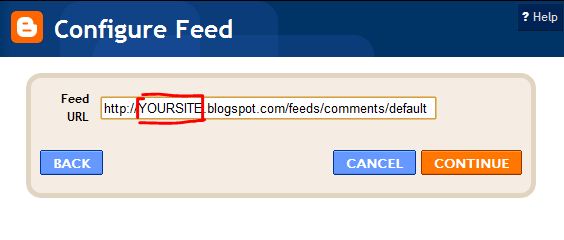
4. Akan jadi macam ini


http://YOURSITE.blogspot.com/feeds/comments/default 


Dalam yang dipetakkan tu, bubuhla nama blog korang. Kiranya link yang first, macam saya,
aimifiqa.blogspot.com

Lepas itu, dia akan keluar retrieving feed.....

And jadi macam ni pula
Yang ni bolehla korang pilih mengikut citarasa masing2 dan kesesuaian anda.

p/s : Komen kalau jadi dan tak jadi pun sama. :D

Thanks for reading. Easily to drop comment here. Like also :)

Related Posts Plugin for WordPress, Blogger...